“Hi Mum, I’ve Broken My Phone”: How Family Scams Work
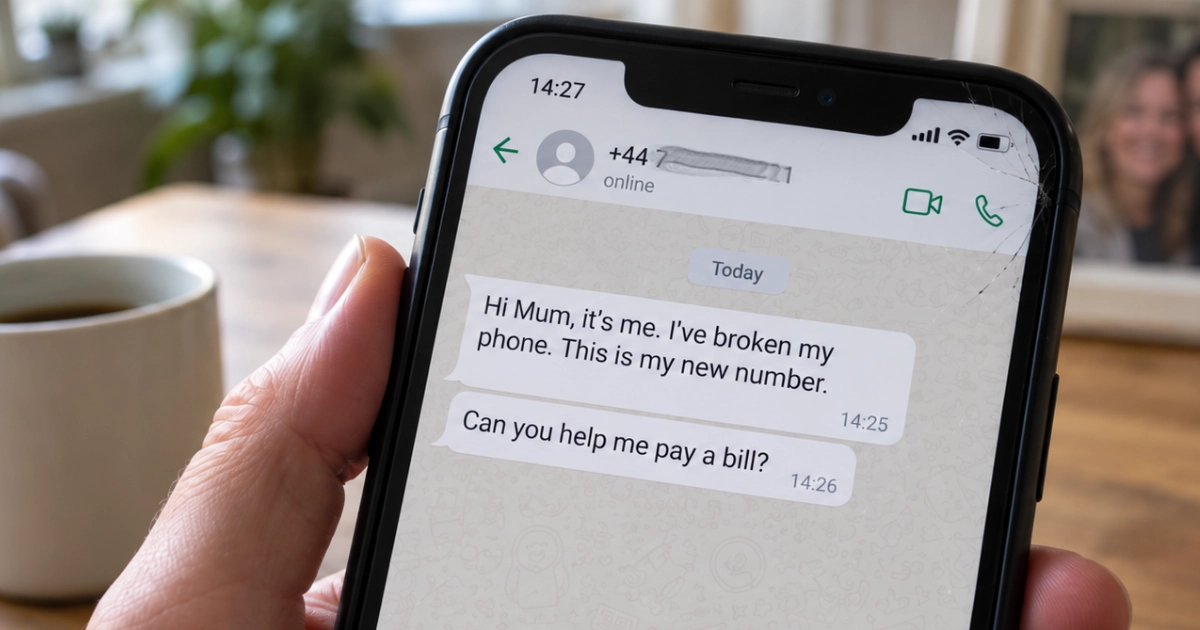
It's usually called the “Hi Mum” scam, but dads get targeted too. I've been targeted twice myself.
Both times, someone sent me a message pretending to be one of my children, claiming to be contacting me from a different phone.
Fortunately, on both occasions, my actual children were with me. It made spotting the scam rather easy!
But I've thought about how differently it might have gone if one of them had been away with friends, or if the message had arrived while I was busy dealing with something else.
And that's what makes these scams particularly unpleasant. They don't rely on you being bad with technology. They rely on you caring about someone.
In a hurry?
- New number and a request for money? Pause. Call your family member using the number already saved in your contacts.
- A familiar voice isn't proof. Agree a private family safe phrase, and check money requests independently.
- Already sent money? Contact your bank immediately. You may be entitled to reimbursement.
It starts with a perfectly ordinary message
You receive a WhatsApp message or text from a number you don't recognise.
Hi Mum, it's me. I've broken my phone so I'm using a different number. Can you save this one?
Nothing especially alarming there. Phones get broken, lost and replaced all the time.
A few messages later, though, there's a problem. They need to pay a bill, replace the phone, or transfer some money urgently. Their banking app isn't working on the replacement phone, and could you possibly help them out until tomorrow?
They might ask for £200, £500 or considerably more. The money needs to go to a particular bank account, sometimes supposedly belonging to a friend.
And because it's your son, daughter or grandchild, your first instinct might be to help.
Criminals can just as easily pretend to be a partner, sibling or close friend. The relationship might change, but the approach is much the same.
It's far from uncommon. Virgin Money reported that its customers lost more than £409,000 to WhatsApp impersonation scams in 2025, with an average loss of £1,740 per affected customer. In a survey of 2,000 UK adults, 35% said they'd received a supposed “Hi Mum/Hi Dad” message asking for money.
A real conversation from December 2025
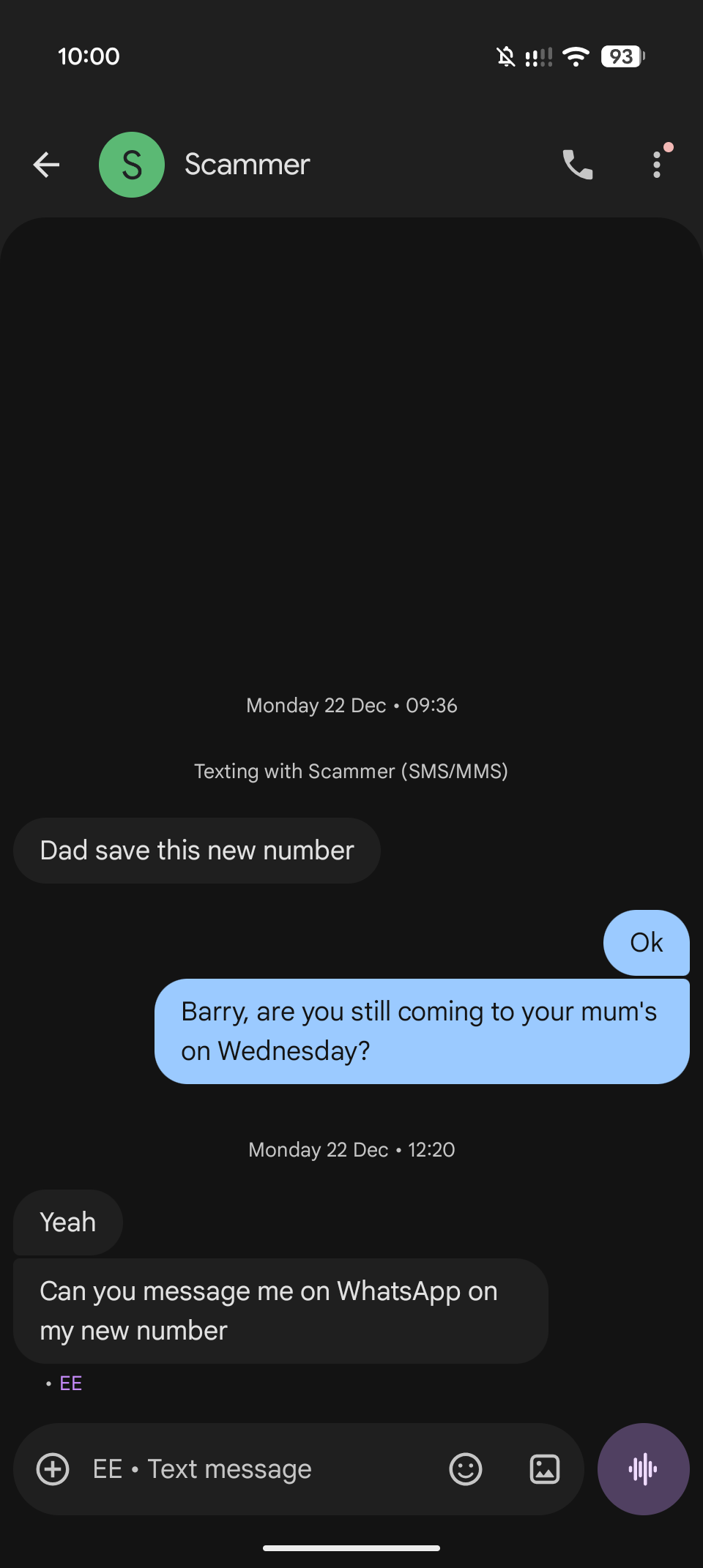
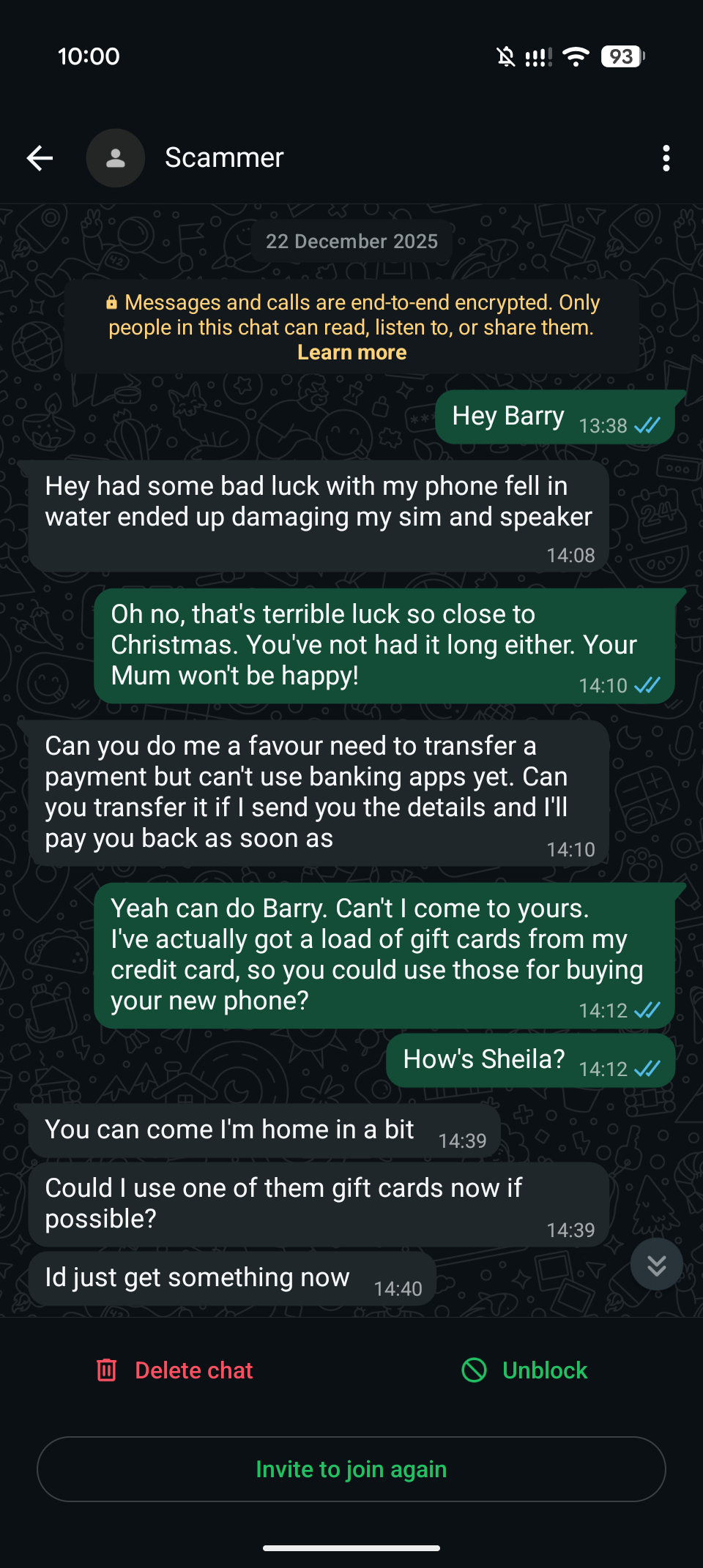
These are screenshots from a conversation I had on 22 December 2025. It began with a text asking Dad to save a new number, then moved to WhatsApp and a request for money.
Please don't engage with scammers
I continued this conversation for research purposes, to see how the approach developed. That isn't what I'd advise you to do. Don't reply, play along or try to catch someone out. Contact your family member independently using a number you already know, then report and block the suspicious contact.
My replies here are part of that exchange, not instructions to follow. In particular, the comments about bank warnings, screenshots and confirmation codes are not a guide to how bank payments work. Never share banking codes or screenshots of your banking app with someone who contacts you unexpectedly.
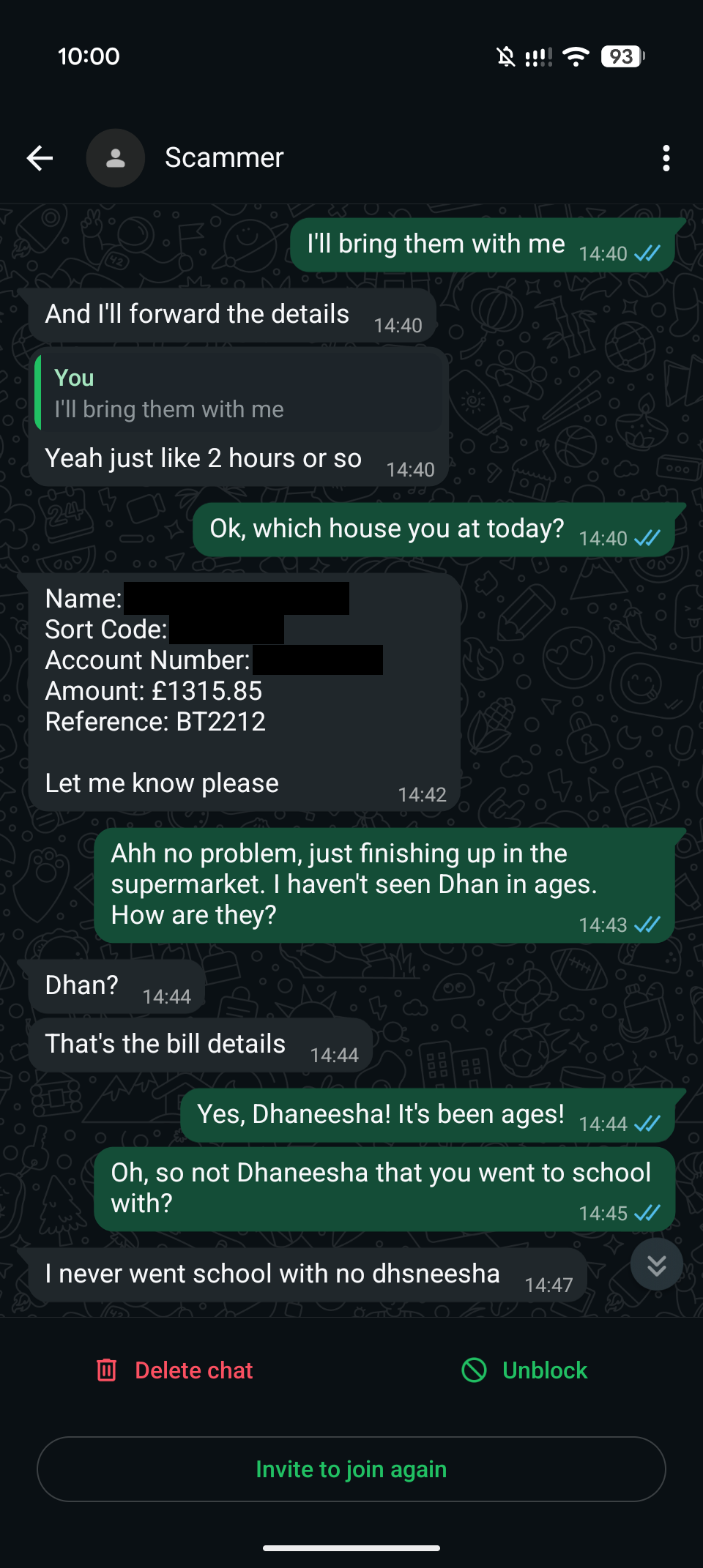
I subsequently blocked and reported the number and supplied these screenshots as part of my online scam report. The account holder's full name and bank details have been covered in the published copies.
Read the five screenshots in order below. Select an image to enlarge it; the captions explain the main points without needing to read every message.
 Enlarge screenshot 1
An SMS asks Dad to save a new number. After my reply supplies a name, the sender agrees and asks to move the conversation to WhatsApp. Notice how little information they provide themselves.
 Enlarge screenshot 2
On WhatsApp, the sender claims water has damaged their SIM and speaker, then says they cannot use banking apps. When I mention gift cards, they ask to use one immediately.
 Enlarge screenshot 3
The sender supplies an account in another name and asks for £1,315.85. The account holder’s full name, sort code and account number are redacted here. Being given payment details does not establish who is asking.
 Enlarge screenshot 4
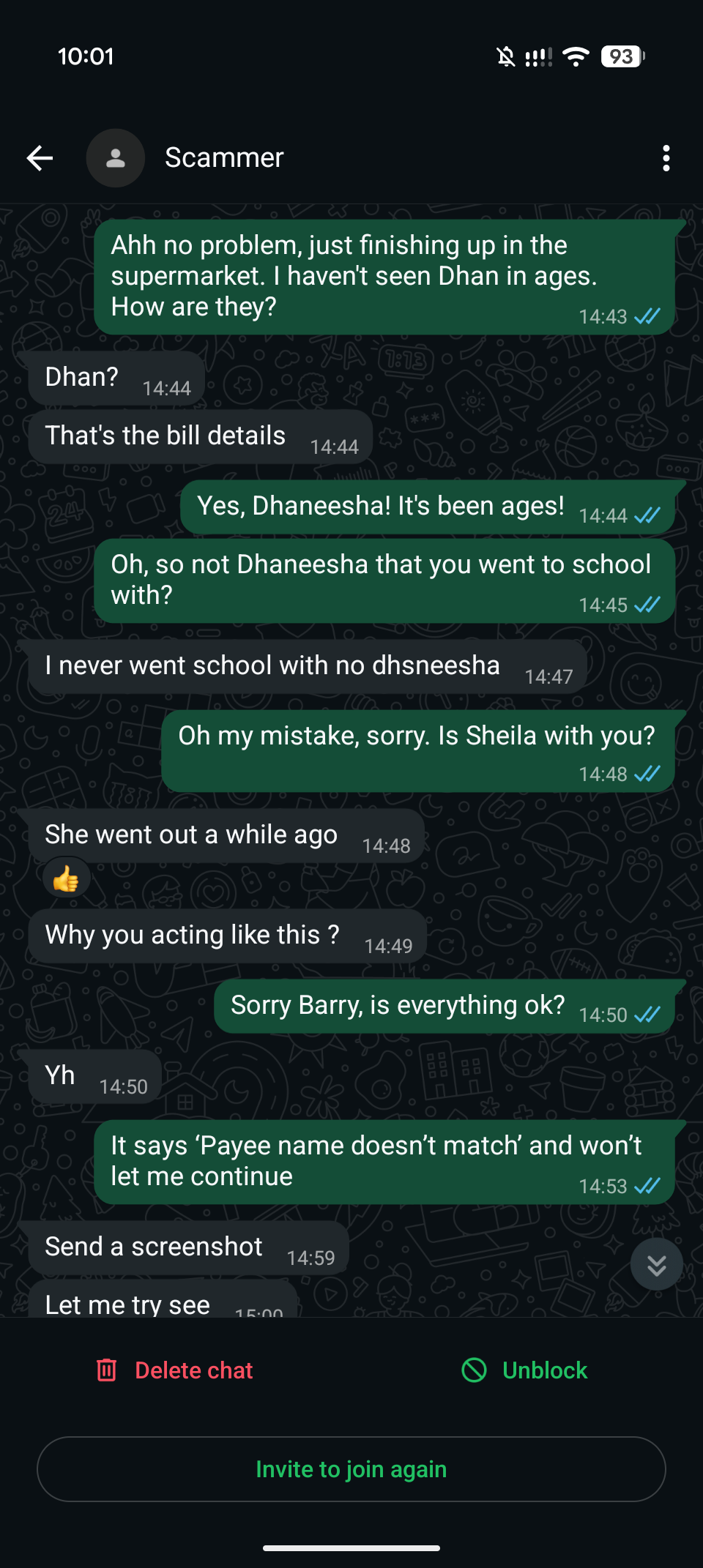
The sender responds to names I introduce, says someone has gone out, and challenges me for asking questions. When I mention a payee-name warning, they ask for a screenshot.
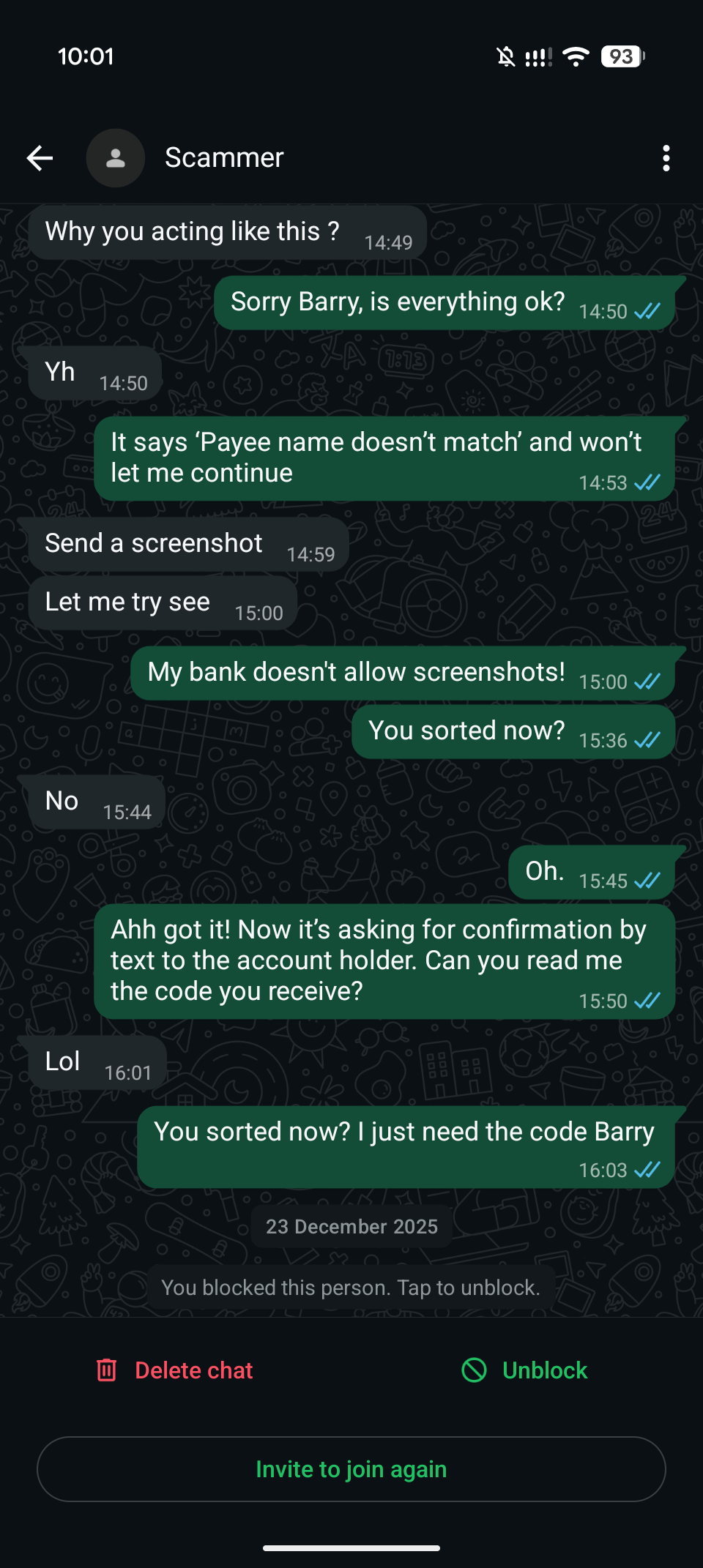 Enlarge screenshot 5
The conversation continues with requests for a banking screenshot and my replies about a confirmation code. These replies are not banking advice. The screenshot records that I blocked the contact on 23 December.
The warning signs to look out for
These scams tend to follow a similar pattern. There isn't always an obvious spelling mistake or suspicious-looking link, but there are some common warning signs:
- A new or unfamiliar number. They claim their usual phone is broken, lost or stolen.
- They can't speak to you. There's an explanation for why calling their old number or speaking on the phone isn't possible.
- Something is urgent. A bill needs paying, they're stranded, or there's another problem that apparently can't wait.
- They want money sent somewhere unusual. Perhaps to a friend's account because their own banking app isn't working.
- They don't want you to tell anyone. They might say they're embarrassed, or ask you not to mention it to Mum, Dad or another family member.
Be particularly careful if someone tells you to pay money into another person's bank account.
Most banking apps use a system called Confirmation of Payee, which checks whether the name you enter matches the name registered to the receiving account.
Scammers know about this. They might claim they're borrowing a friend's account and even tell you exactly which name to enter, so the bank's name check won't raise an obvious warning.
A matching account name doesn't prove the story
If your banking app displays a “no match” or “close match” warning, stop and check. But remember that even a successful match only confirms the account name. It doesn't prove that the request for money is genuine.
None of these warning signs individually proves that a message is fraudulent. Real families have emergencies, and people genuinely do lose their phones.
But when an unexpected message combines a new number, a request for money and pressure to act quickly, it's time to stop and check.
Why these scams work
The criminals understand how people behave when someone they love appears to need help.
They're particularly good at creating urgency. If somebody is asking you to transfer money immediately, you're less likely to have time to question the story, speak to another family member or notice something that doesn't quite add up.
Sometimes scammers know personal details about your family, perhaps names or information they've found on social media. Other times, they send the same generic message to thousands of numbers, hoping it reaches somebody who believes it's genuine.
Either way, the aim is the same: to make you act on instinct before you've had a chance to think.
And increasingly, there's another complication.
What about AI and cloned voices?
Until fairly recently, these scams mostly relied on written messages. But artificial intelligence is making it easier for criminals to imitate someone's voice too.
AI voice cloning uses software to analyse recordings of somebody speaking and generate new speech that sounds like them. Depending on the quality of the recordings and the software involved, the result can be surprisingly convincing.
Think about the videos we share on Facebook, Instagram, TikTok or YouTube. Some contain plenty of examples of people speaking naturally, which could potentially be used to create an artificial version of their voice.
Now imagine receiving a phone call from what sounds like your daughter. She's upset, says she's in trouble and desperately needs you to send some money.
It might even arrive as a short WhatsApp voice message, apparently recorded by the person you know.
Hearing that familiar voice would naturally make the situation feel more believable than receiving a message from an unknown number.
The Government's Stop! Think Fraud campaign specifically warns about criminals using AI-generated voices to impersonate people we know.
That doesn't mean every family scam involves sophisticated technology. The two attempts I've received were ordinary messages, without any cloned voices.
But it does mean that recognising someone's voice is no longer necessarily proof that you're speaking to them.
Fortunately, protecting yourself doesn't require being able to recognise an AI-generated voice.
Two simple ways to protect your family
You don't need expensive security software or specialist technical knowledge to make these scams much less likely to succeed.
There are two straightforward habits I'd encourage every family to adopt.
1. Contact them yourself, using a number you already know
This is the most important advice in the whole article.
If you receive an unexpected message claiming to be from a family member who needs money, don't arrange a payment through that conversation.
Instead, call them on the number you already have saved for them.
Call from your saved contacts
Don't just tap the call button at the top of the suspicious WhatsApp conversation. That would call the person who sent the message, potentially the scammer.
- Leave the conversation.
- Open your normal Phone or Contacts app.
- Find your family member's existing contact and call that number instead.
If they answer and tell you they haven't sent the message, you've got your answer.
Of course, the scammer may have claimed that their original phone is broken or missing. You could try another established way of contacting them, speak to someone they're with, or ask another family member to help you reach them.
And remember that even a message appearing to come from someone's usual account isn't absolute proof. Messaging accounts can be taken over, and the number displayed during a phone call can sometimes be faked.
The important thing is to verify the request independently, rather than relying on information provided by the person contacting you.
A genuine family member might be frustrated by a delay, but they'll understand why you've checked.
2. Agree a family safe phrase
Here's an idea that's wonderfully low-tech.
Next time you're all together for Sunday lunch, agree on a private phrase that family members can use to confirm their identity in an unusual situation.
Choose something memorable but difficult for an outsider to guess. Avoid birthdays, pet names, addresses or anything that might be obvious from your social media accounts.
If somebody unexpectedly contacts you claiming to be a family member in trouble, ask them to tell you the phrase.
Don't give them hints, and don't reveal the phrase yourself.
Ideally, agree it face to face rather than sending it around in messages, and keep it within the family.
This isn't just my suggestion. The Government's Stop! Think Fraud guidance also recommends agreeing a safe phrase with close friends and family.
It's not a perfect system. A phrase could become known to somebody else, particularly if a family account has been compromised. And it shouldn't replace independently checking a request when money is involved.
But it's another useful precaution, especially when hearing a familiar voice might no longer be enough.
And it costs absolutely nothing.
What should you do if you receive one of these messages?
First, don't panic. Receiving a scam message doesn't mean your phone has been hacked or that criminals have access to your accounts.
If you've simply received the message, don't engage with it. Check that your family member is safe using their usual contact details.
You can report suspicious WhatsApp messages using WhatsApp's built-in reporting feature. If you've received a scam text message by SMS, you can forward it free of charge to 7726, which alerts your mobile provider.
Ofcom's guide to reporting scam messages explains how to do this on different devices.
If you've already replied, that alone doesn't normally mean your phone is compromised. Stop the conversation and don't share any more information.
What if you've already sent money?
Contact your bank immediately
Use your banking app, the number on the back of your card, or call 159 to reach a participating bank's fraud department.
Explain what's happened and ask the bank to investigate and recover the payment.
There's something important you should know here. Even if you authorised the transfer yourself, you may still be entitled to reimbursement.
Since October 2024, UK payment providers have been required to reimburse eligible victims of what's known as authorised push payment (APP) fraud. This is when someone tricks you into transferring money to a criminal.
For qualifying transfers between UK accounts over Faster Payments or CHAPS made on or after 7 October 2024, the rules provide for reimbursement of up to £85,000 per claim, normally within five business days. If the bank needs more time to investigate, it must reach an outcome within 35 business days.
There are some conditions. Banks can apply an excess of up to £100, although not for vulnerable customers, and claims must be reported within 13 months of the payment.
Reimbursement can also be refused if someone was complicit in the fraud or acted with gross negligence. Gross negligence is a high bar, and the bank must be able to demonstrate it. Simply being tricked into making a payment doesn't automatically mean you were grossly negligent. The gross-negligence exception doesn't apply to vulnerable customers.
You can read more about your rights on the Payment Systems Regulator's website.
Most importantly, don't assume that because you made the payment yourself, there's nothing the bank can do.
Keep the messages and payment details, and report the incident through Report Fraud, the national reporting service for England, Wales and Northern Ireland. In Scotland, report fraud to Police Scotland on 101.
Watch out for a second scam
People who've already lost money to fraud are sometimes targeted again. Be very wary of unexpected calls, messages or online adverts offering to recover your money, particularly if they demand a fee upfront.
Criminals may even pretend to be from your bank or the police. The police won't charge you to recover stolen money, and neither your bank nor the police will ask you to transfer funds to a supposedly “safe” account.
If you've also shared passwords, banking codes or clicked suspicious links, there may be additional steps you need to take to secure your accounts.
My free Scam First Aid tool can help you work through what to do, in the right order. It doesn't ask you to share sensitive information with me, and your answers stay on your own device.
The best protection isn't technical
We spend a lot of time talking about online security in terms of passwords, antivirus software, security updates and two-factor authentication. All of those things matter.
But family impersonation scams exploit something that no software can completely protect: the trust we place in the people closest to us.
The criminals aren't necessarily trying to outsmart your phone. They're trying to rush you into making a decision you wouldn't ordinarily make.
So have that conversation with your family. Agree that nobody will be offended if an unusual request for money gets checked, even when it appears to come from someone you know.
And perhaps come up with that safe phrase over Sunday lunch.
You don't need to become an expert at spotting fake messages or AI-generated voices. You just need a reliable way of checking who's really asking for help.
Need help making your accounts safer?
If you're unsure about your account security or need help working through the next steps after a scam, I can help explain what to check in plain English.
If money has been sent, contact your bank first. For practical steps you can take now, use my free Scam First Aid tool.
I’m based in Marple and cover Stockport, SK6 and the surrounding area.