What Happens When You Click "Accept All"? Cookies and Privacy Explained
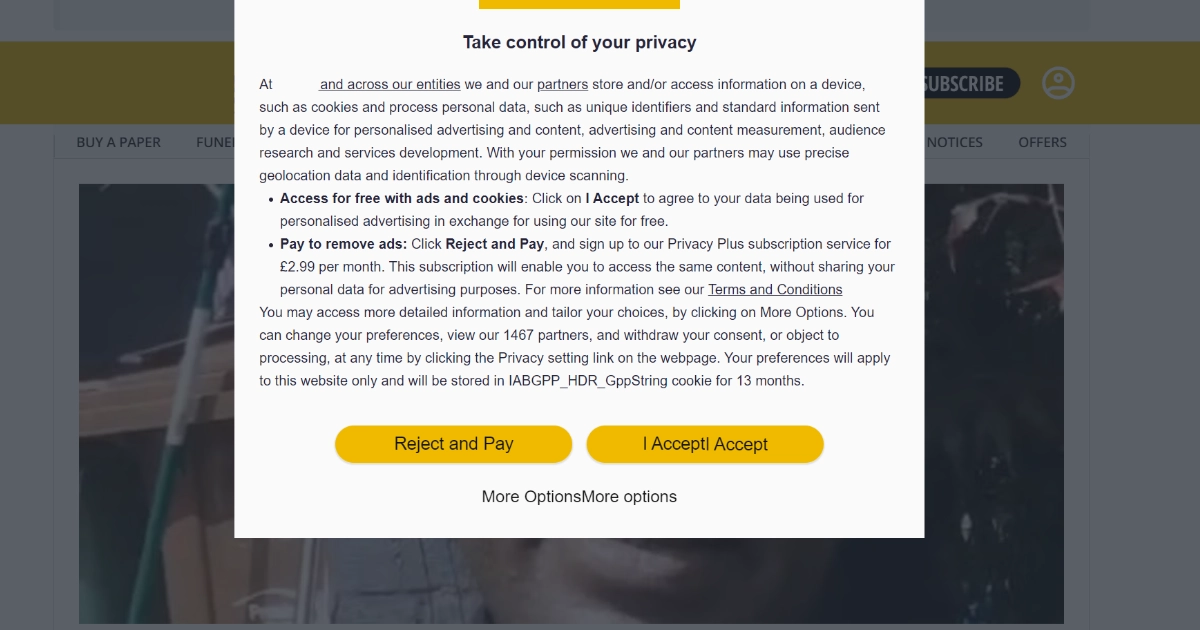
You visit a website to read an article and, before you've got anywhere near it, a message appears.
Accept all. Manage choices. Reject all.
Or, increasingly on some British websites:
Accept personalised advertising, or pay to continue without it.
Most of us have become so used to these messages that we barely read them. We just press whichever button gets us to the thing we actually came for.
But if a website is now putting a price next to one of those choices, it's reasonable to wonder what you're actually agreeing to when you press Accept all.
The reassuring answer is that accepting cookies doesn't suddenly give a website access to everything on your computer or phone.
Depending on the website, though, it can allow information about the way you use websites and services to be collected and used.
So what does that actually mean?
- What is a cookie?
- Not all cookies do the same thing
- What information am I actually giving away?
- It isn't really just about cookies any more
- Why are some websites saying "accept or pay"?
- What each button actually does
- Should I press "Reject all"?
- Why didn't Marple Tech Help ask me to accept cookies?
- What about Incognito or Private Browsing?
- Can I change my mind later?
- The simple version
What is a cookie?
At its simplest, a cookie is a small piece of information that a website can save in your web browser.
Cookies aren't automatically bad. Some are extremely useful.
A shopping website might use one to remember what's in your basket. Another might keep you signed in as you move between pages. A website might remember your language or display preferences.
The same basic technology can also be used for statistics, advertising and tracking, which is where the privacy questions start.
Not all cookies do the same thing
It helps to think of them in a few broad groups.
Cookies that make a website work
These might keep you signed in, remember what's in your basket, help prevent fraud or remember something you've specifically asked the website to do.
Some are necessary for the service you're using.
Cookies used for website statistics
A website owner might want to know which pages are popular, roughly how many people visit, whether visitors tend to use phones or computers, or whether people are giving up halfway through a page because something isn't working properly.
This can be useful without building a detailed profile of individual visitors.
The Data (Use and Access) Act 2025 changed the UK rules here, and the change took effect on 5 February 2026. Some limited website statistics can now be collected without asking for consent first, as long as the measurement is only about the website you are actually on, visitors are given clear information about it, and there is a simple, free way to object.
Cookies used for advertising
This is where things become more interesting from a privacy point of view.
Advertising companies aren't necessarily interested in knowing that one particular person looked at one particular page.
What can be valuable is recognising the same browser or device again and gradually learning something about the person using it.
Imagine somebody spends a few weeks:
- reading reviews of electric cars
- looking at holidays in Greece
- visiting mortgage websites
- comparing walking boots
- reading gardening articles
- clicking an advert for outdoor clothing
None of those things is especially revealing on its own.
Put enough information together, though, and it becomes fairly easy to infer that this person might be interested in travel, cars, property, gardening and walking.
That sort of profile can be useful for deciding which adverts to show them.
Advertising and profiling aren't covered by the new UK statistics exception. Websites using tracking for those purposes still generally need your consent.
What information am I actually giving away?
This varies enormously between websites.
Pressing Accept all does not mean a website can suddenly look through your photographs, read your emails or see the documents stored on your computer.
What you may be allowing is information about your online activity to be collected.
That might include:
- pages you visit
- links and buttons you click
- adverts you interact with
- roughly where you are
- the type of phone or computer you're using
- your browser
- how long you spend on pages
- whether you buy something after seeing an advert
- identifiers that allow your browser or device to be recognised again
Companies may then make educated guesses about your interests.
You haven't necessarily told somebody, "I'm interested in holidays in Greece." Your activity may simply have allowed them to work that out.
It isn't really just about cookies any more
We still call them "cookie banners", but cookies are only part of the picture.
Websites and advertising systems can use other techniques, including tracking pixels, browser storage and ways of recognising characteristics of a particular device.
The Information Commissioner's Office, the UK's data protection regulator, now uses the broader term storage and access technologies, and its current guidance on them was finalised in April 2026.
Thankfully, you don't need to understand how all of these technologies work.
For most of us, the useful question is much simpler:
Am I happy for information about my activity to be used to personalise advertising or build a picture of my interests?
Why are some websites saying "accept or pay"?
This is something more people have started noticing.
Instead of simply offering Accept or Reject, some websites give you a choice along the lines of using the site with personalised advertising, or paying to use it without.
This is sometimes called "consent or pay".
The reasoning is fairly straightforward. Running a large website costs money, and advertising is one way of paying for it. Advertising aimed at particular interests can be more valuable than adverts shown without that information.
So you're effectively being offered two ways of funding the service: pay for access with money, or allow your information to be used for personalised advertising.
UK data protection rules don't automatically prohibit this model. The ICO's position is that it can comply with the law where people can genuinely give their consent freely. It expects websites to think about whether people have a realistic choice, whether the fee is appropriate rather than inappropriately high, whether both options give you a broadly equivalent service, and whether the choice is explained clearly enough for people to understand it.
It's also worth remembering that paying doesn't necessarily mean the website knows nothing about you. It may still need information to provide the service, operate your account, process payment or keep the site secure.
The difference is that your information shouldn't then be used for the personalised advertising you've paid to avoid.
What each button actually does
Banners are worded differently on every website, but the buttons usually mean roughly this.
| Button | What you're agreeing to |
|---|---|
| Accept all | Everything the banner lists, which usually includes advertising and profiling by the website and its partners. |
| Reject all or Necessary only | Just the parts needed to run the website, plus any limited statistics the rules allow. You'll still see adverts, they just won't be chosen using a profile. |
| Manage choices | A list of purposes and partners you can allow or refuse individually. Slower, but it's where the detail lives. |
| Accept or pay | Either personalised advertising, or a subscription. Check what the paid option costs, and whether it's a rolling subscription, before choosing it. |
Should I press "Reject all"?
There isn't one answer that's right for everybody.
If you'd rather minimise advertising tracking and profiling, Reject all or Necessary only is usually the straightforward option.
You may still see adverts. They just won't necessarily be selected using the same sort of personalised profile.
Manage choices can be useful if you want more control over what you allow.
And if you understand what is being requested and you're comfortable with personalised advertising, you don't need to feel worried or guilty about pressing Accept all.
For most people, this isn't a choice between "safe" and "dangerous". It's a privacy choice.
It's worth keeping that in proportion. Cookie banners are the visible part of online privacy, but the things that actually cause people trouble are usually elsewhere: reused passwords, accounts without two-factor authentication, and convincing scam messages.
Why didn't Marple Tech Help ask me to accept cookies?
You may have noticed that this website didn't greet you with a large cookie banner.
That isn't because anything is being hidden from you.
Marple Tech Help doesn't use advertising trackers or marketing pixels, and nothing here is shared with advertising companies.
The website's own measurement is self-hosted, and it sets no cookies. It does store two small items in your browser: a random visitor ID, so that repeat visits are counted once rather than several times, and a short-lived session marker. Neither contains your name, your email address or anything you have typed, and they're used to work out things like which pages are read and whether people are finding what they came for. The visitor ID is a random value that gets replaced every 90 days, so it can't follow you around indefinitely.
One thing does happen off this website. Roughly where you are, meaning the town and country rather than anything more precise, is looked up from your IP address by a specialist service. It's a useful thing for a local business to know. That service receives the IP address and nothing else, and the address itself isn't stored here.
That is the sort of first-party measurement the UK rules now allow without a consent banner, provided you're told about it and given a simple way to object. So there's a button for exactly that on the privacy policy page, which turns all of it off for your browser, the location lookup included.
Some technology is still needed to make the website work and keep it secure. The contact forms use an anti-spam system which may place a small security token in your browser, and UK rules allow strictly necessary technology like that without asking you to click Accept first.
You can read exactly what this website uses, and why, in the Marple Tech Help privacy policy.
What about Incognito or Private Browsing?
Opening an Incognito, InPrivate or Private Browsing window can be useful, but it doesn't make you anonymous on the internet.
Its main job is to stop certain information from that browsing session being left behind on your device afterwards.
For example, your normal browsing history won't usually record those pages, and temporary cookies from the private session are normally removed when you close it.
Websites can still receive information from your browser while you're visiting them.
Private browsing is especially useful on a shared computer. It isn't an invisibility cloak, and neither is a VPN, which I've written about in are you paying for a VPN you don't need?
Can I change my mind later?
Usually, yes.
Many websites provide a Cookie settings, Privacy choices or similar link, often towards the bottom of the page.
Your web browser can also delete cookies that have already been stored.
Just remember that deleting all cookies has some ordinary consequences too. You'll probably be signed out of websites, and some preferences those websites remembered for you will disappear.
The simple version
Cookies themselves aren't something to be frightened of. Some perform mundane jobs that make websites work properly, while others can be used as part of much larger advertising and tracking systems.
When you see a cookie banner, the useful thing isn't to automatically press Accept all or automatically press Reject all.
It's to understand the exchange being offered.
The next time a website asks you to Accept all, you'll have a much better idea of what that button actually means.
Still not sure what your computer is doing with your data?
There is nothing to buy at the end of this one. It is simply the sort of question I get asked in people's living rooms: what are all these pop-ups agreeing to, why does this website want money now, and is my computer safe?
If cookie settings, browser privacy or clearing stored data has become confusing, I am happy to talk it through in plain English. If it turns into a job worth booking, we can sort that out then, and if it doesn't, you have still got your answer.
You can also read exactly what this website stores, and turn its measurement off, on the privacy policy page.
I’m based in Marple and cover Stockport, SK6 and the surrounding area.