How to Remove Activation Lock from an iPhone or iPad
If you are staring at an iPhone or iPad screen demanding an Apple Account email and password you do not have, you are not alone.
Whether you have just bought a second-hand device, inherited an iPad from a late family member, or simply dusted off an old phone, hitting the Activation Lock screen can feel incredibly frustrating.
Apple can remove Activation Lock in certain cases, provided you can prove the device belongs to you. This guide explains what Activation Lock is, what evidence gives you the best chance of success, and the step-by-step process to get your device working again.
Apple now refers to your account as your Apple Account, although many people still know it as an Apple ID. The two terms mean the same thing throughout this article.
If you are in Marple, Stockport, or the SK6 area and have an iPhone or iPad stuck on Activation Lock, Marple Tech Help can guide you through Apple's official process, help you find the serial number or IMEI, organise the right documents, and get the device set up again if Apple releases the lock.
This advice is based on direct, recent experience helping a local client in Marple navigate this exact process following a bereavement. The process took several weeks of correspondence with Apple, but ultimately succeeded.
Important: Marple Tech Help cannot bypass Activation Lock, and neither can any legitimate local repair business. What I can do is help you work through Apple's official process properly, avoid scams, organise your evidence, and get the device set up again if Apple releases the lock.
- What is Activation Lock?
- Before Buying a Second-Hand Apple Device
- Avoiding Scams and Bypass Services
- Your Three Legitimate Options
- Official Apple Links
- What Proof of Ownership Should You Gather?
- Step by Step: Submitting the Request to Apple
- Common Questions
- How to Prevent This
- How Marple Tech Help Can Assist
What is Activation Lock?
Activation Lock is a core component of Apple's Find My security system.
When Find My is enabled on a device, Activation Lock switches on automatically. Its purpose is to prevent anyone else from wiping and reusing the device without the correct Apple Account credentials.
That is a sensible security measure to deter thieves. It becomes a real obstacle, however, when:
- a family member has forgotten their Apple Account details
- the device belonged to someone who has passed away
- the previous owner forgot to remove the device from their account before selling it
- the device was reset before Find My was turned off
- the original email address associated with the account no longer exists
In these situations, the device may genuinely belong to you, but Apple's systems have no way of knowing that until ownership is established.
Before Buying a Second-Hand Apple Device
If you are buying a used iPhone or iPad, never hand over money until you have seen it reach the standard Hello setup screen without asking for a previous Apple Account.
Ideally, meet the seller in person and have them erase the device in front of you.
A cheap iPad that cannot be activated is not a bargain. It is a paperweight.
Avoiding Scams and Bypass Services
Before proceeding, an important warning: avoid any website, app, or individual claiming they can bypass, hack, or remove an iCloud lock for a fee.
Activation Lock is designed precisely to stop unauthorised bypasses. Services claiming they can remove it without proper proof of ownership are, at best, a waste of money.
At worst, they are outright scams that will take your payment and deliver nothing, or install malicious software on your computer.
There are only three legitimate routes:
- use the Apple Account that is already linked to the device
- ask the previous owner to remove the device from their Apple Account
- submit an official Activation Lock support request to Apple with proof of ownership
Your Three Legitimate Options
| Your situation | Best solution |
|---|---|
| You know the Apple Account details | Enter the email address and password on the Activation Lock screen. If the password has been forgotten, try Apple's account recovery process first. |
| The previous owner is available | Ask them to log in to iCloud.com/find and remotely remove the device from their account. |
| The original owner has passed away or is unreachable | Submit an official Activation Lock support request to Apple with clear proof of ownership. |
Official Apple Links
The following Apple pages are the most relevant ones for this process. Use these rather than third-party "unlocking" websites.
| What you need to do | Official Apple page | When to use it |
|---|---|---|
| Start an Activation Lock removal request | How to remove Activation Lock | Use this if you own the iPhone or iPad but cannot access the Apple Account it is locked to. Apple may ask for proof of purchase documentation. |
| Understand what Activation Lock is | Activation Lock for iPhone and iPad | Useful background if you want to understand why the device is locked and why Apple treats it seriously. |
| Ask a previous owner to remove the device | Remove a device from Find Devices on iCloud.com | Use this if the previous owner is still contactable and can remove the device from their account remotely. |
| Access a deceased family member's Apple Account | Request access to a deceased family member's Apple Account | Use this if the iPhone or iPad belonged to someone who has passed away. This may be relevant alongside an Activation Lock request. |
| Set up a Legacy Contact | How to add a Legacy Contact for your Apple Account | Use this now, while everything is working, to make life easier for your family later. |
| Add an account recovery contact | Set up an account recovery contact | Useful for prevention. This is different from a Legacy Contact: a recovery contact helps you regain access to your Apple Account while you are alive if you get locked out. |
Always check that you are on Apple's own website before entering any Apple Account details, uploading documents, or starting a support request.
Option 1: You Know the Apple Account Details
If you know the Apple Account email address and password, enter them on the Activation Lock screen.
If the password has been forgotten, try Apple's account recovery process first. This is usually much quicker than asking Apple to remove Activation Lock manually.
It is worth checking:
- old email addresses
- password managers
- written password books
- other Apple devices still signed in to the same account
- whether the Apple Account uses a mobile number rather than an email address
If you can regain access to the Apple Account, you may not need to submit an Activation Lock removal request.
Option 2: The Previous Owner is Available
If the iPhone or iPad was bought second-hand, passed down, or given to you, the previous owner may be able to remove Activation Lock remotely.
They do not usually need the device in their hands.
They can go to iCloud.com/find.
Then they should:
- sign in with the Apple Account linked to the device
- select the device
- remove it from their account
Once the device has been removed from their account, restart the iPhone or iPad and try setting it up again.
If the seller cannot or will not do this, that is a serious warning sign.
Option 3: Asking Apple to Remove Activation Lock
If you cannot access the Apple Account and the previous owner is unavailable, Apple may remove the lock manually.
This is not guaranteed.
Apple will scrutinise your evidence carefully and may reject the request if the documentation is insufficient.
What Proof of Ownership Should You Gather?
The gold standard is the original purchase receipt or invoice.
Ideally, it should clearly show:
- the retailer
- the date of purchase
- the exact device model
- the serial number, IMEI, or MEID
- the buyer's name, where available
For UK customers, strong evidence may include:
- receipts from Apple, Currys, John Lewis, Argos, Amazon, or another recognised retailer
- mobile network contracts from EE, O2, Vodafone, Three, Sky Mobile, Tesco Mobile, or similar
- official insurance replacement documentation
- probate documents, death certificates, or other family documentation where the original owner has died
- business, school, or organisational records if the device was issued through an institution
A standard bank statement showing a payment to "Apple" or "Currys" is rarely sufficient on its own, because it does not link the transaction to a specific device.
Where to Find the Serial Number or IMEI
Apple needs an exact match to process your claim.
You may find the serial number or IMEI:
- on the original box
- on the purchase receipt or invoice
- in mobile network paperwork
- on insurance documents
- engraved on the back of some older iPads
- on the SIM tray of some iPhones
- by tapping the small information icon on the Activation Lock screen, if it appears
Do not guess. Apple needs an exact match.
What Apple Will Not Usually Do
Apple will not normally remove Activation Lock simply because you physically possess the device.
They need to be satisfied that you are the legitimate owner, or that you have the legal right to deal with it.
The following details may support your case, but are usually weak on their own:
- "It was in a drawer at home"
- "It belonged to my relative"
- "I know the passcode"
- "I have the charger and the box"
- "I bought it on Facebook Marketplace but the seller has disappeared"
Those details may help fill in the picture, but Apple will generally want something that positively links the device, by serial number or IMEI, to a named owner or purchaser.
Step by Step: Submitting the Request to Apple
1. Verify other options first
Double-check that the Apple Account holder genuinely cannot remove the device themselves, and that the password cannot be reset.
If the Apple Account route works, it is usually quicker than submitting a manual Activation Lock request.
2. Gather your evidence
Create a single digital folder containing clear photos or PDFs of the receipt or invoice, serial number or IMEI evidence, the device itself, the Activation Lock screen, and any supporting documents explaining ownership.
If you are dealing with a deceased family member's device, write a brief, factual summary before you start.
This iPad belonged to my late wife. It was erased after her death and is now locked. The original proof of purchase showing the serial number is attached.
Keep it straightforward. Apple does not need an emotional account. It needs a clear chain of ownership.
3. Visit Apple's official support page
Go directly to Apple's Activation Lock support page: How to remove Activation Lock.
Avoid any third-party unlocking sites.
4. Complete the request carefully
Enter the serial number or IMEI meticulously. A single digit error can cause a rejection.
Upload clear, readable images or PDFs. If a receipt is faded, photograph it in good natural light before uploading.
5. Wait for Apple's response
Apple will review the request and email you their decision.
If the request is refused, read the reasoning carefully. Common issues include the document not showing the serial number, unclear photos or scans, an insufficient ownership chain, or submitted device details that do not match Apple's records.
It is possible to resubmit with stronger documentation, and sometimes persistence pays off.
What Happens After the Lock is Removed?
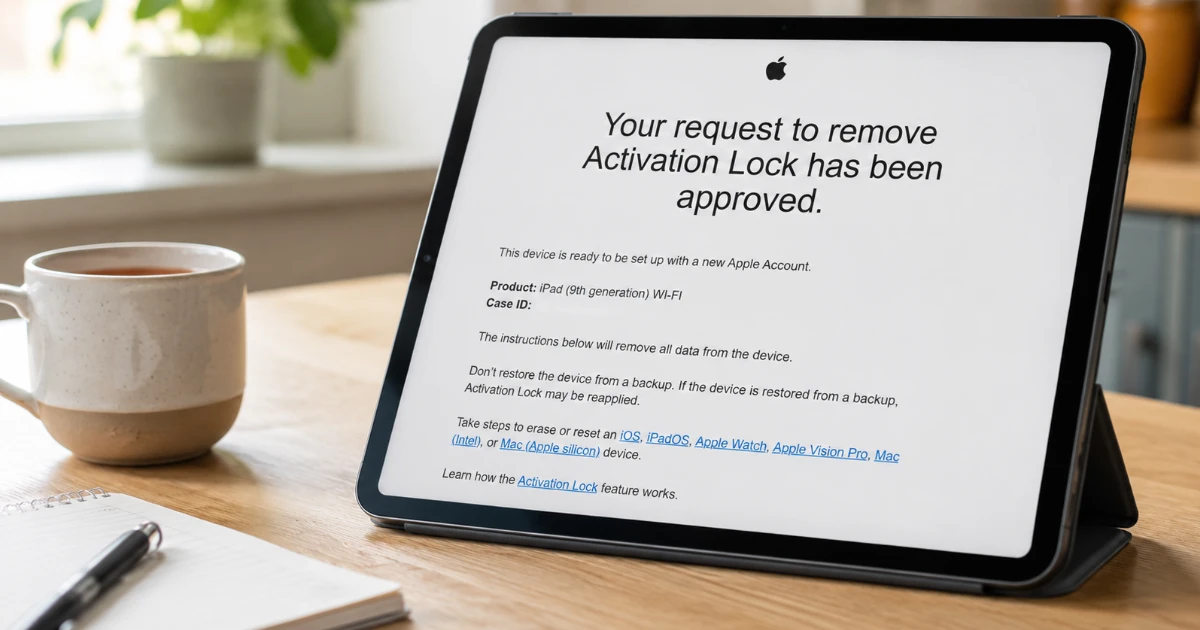
Once Apple approves the request, the device can be set up again from scratch.
It will already be erased or will need to be erased as part of the process.
This is about making the hardware usable again. It is not a route to recovering photos, messages, documents, or other data that was previously on the device.
Common Questions
I have the device passcode. Is that enough?
Usually not.
Once a device is at the Activation Lock stage, the passcode does not usually help. Apple needs either the Apple Account credentials or proof of ownership.
I have the box. Is that enough?
The box helps, particularly if it shows the serial number or IMEI, but Apple will generally want proof of purchase alongside it.
I bought it second-hand. Can Apple unlock it for me?
Possibly, but only with evidence Apple accepts.
If the seller cannot or will not remove it from their Apple Account, go back to them. A legitimate seller should have no difficulty doing this.
The original owner has passed away. What should I do?
Gather as much documentation as you can, including:
- proof of purchase
- death certificate
- probate documents, if relevant
- anything that confirms your right to deal with the estate
- anything that links the device to the person who owned it
Apple also has specific processes for dealing with a deceased person's Apple Account, which may run alongside an Activation Lock request.
Expect the process to take time, and be prepared to correspond with Apple more than once.
How to Prevent This: Setting Up a Legacy Contact
If you are reading this after helping a relative through the Activation Lock process, you will understand exactly how stressful it can be when nobody knows the right Apple Account details.
Apple has a feature called Legacy Contact. It allows you to choose a trusted person who can request access to your Apple Account after your death.
That can make dealing with Apple devices and account-related issues considerably easier for your family, and avoids some of the uncertainty that so often follows a bereavement.
To set it up:
- On your iPhone or iPad, go to Settings and tap your name at the top.
- Tap Sign-In & Security or Password & Security, depending on your iOS version.
- Tap Legacy Contact.
- Tap Add Legacy Contact.
- Choose a trusted person from your contacts.
- Save, print, or share the access key.
Your Legacy Contact does not need to own an Apple device themselves.
Apple will generate a unique access key. Print the key and keep it with your will or estate documents, or send it directly to your chosen contact.
After your death, they will need both the access key and a death certificate to request access via Apple's Digital Legacy process.
It may not remove every practical hurdle automatically, but it gives your family a much clearer and more official starting point than trying to piece everything together without account access or paperwork.
It is one of the most practical pieces of digital admin you can do for the people you leave behind.
Consider Setting Up an Account Recovery Contact Too
A Legacy Contact helps after death.
An Account Recovery Contact helps while you are alive.
This is a trusted person who can help you regain access to your Apple Account if you are locked out. They cannot access your account themselves, but they can help verify your identity during account recovery.
This is a sensible precaution for anyone who relies heavily on Apple devices, especially if they would struggle to recover the account on their own.
Practical Checklist
Before contacting Apple, work through this checklist:
- Do you know the Apple Account email address?
- Can the password be reset via Apple's website?
- Is the previous owner available to remove it from iCloud.com/find?
- Do you have the original receipt or invoice?
- Does the proof of purchase clearly show the serial number, IMEI, or MEID?
- Do you have the original box?
- Can you clearly photograph both the device and the Activation Lock screen?
- Is there any family, business, school, insurance, or probate paperwork that supports your ownership?
- Have you avoided third-party "unlocking" services?
- Have you saved copies of everything you are submitting to Apple?
The stronger your evidence going in, the better your chances of a straightforward outcome.
How Marple Tech Help Can Assist
No independent local business can bypass Activation Lock, and anyone claiming otherwise should be avoided entirely.
What I can do is guide you through the legitimate Apple process.
If you are dealing with a complicated ownership situation, particularly one involving a bereavement, I can help you:
- identify the device
- locate the correct serial number or IMEI
- check whether the device is genuinely Activation Locked
- scan or photograph documents clearly
- compile your evidence into a format Apple can review
- submit the support request on your behalf
- interpret Apple's response
- resubmit with stronger evidence if appropriate
- set up the iPhone or iPad safely if Apple releases the lock
Having someone experienced walk you through it takes much of the stress out of the process. Based on direct experience, it can also make a real difference to how clearly the case is presented.
Need help with Activation Lock?
I cannot bypass Activation Lock, but I can help you work through Apple's official process, gather the right evidence, and avoid wasting money on scam unlocking services.
Local help is available across Marple, Stockport and the SK6 area.
I’m based in Marple and cover Stockport, SK6 and the surrounding area.
Final Thoughts
Activation Lock is genuinely frustrating when you are dealing with a device that is rightfully yours. But it exists for a good reason: it makes stolen iPhones and iPads far less useful to thieves, and that benefits everyone.
For genuine owners, the important thing is not to panic and not to spend money on services that cannot deliver.
Start with the Apple Account route, then try the previous owner, and finally work through Apple's official support process with proper documentation.
The process can take time and, occasionally, more than one attempt. A recent case I worked through with a client in Marple, involving a family iPad following a bereavement, took several weeks of correspondence with Apple before the lock was finally removed.
With the right paperwork, a careful approach, and some patience, it can be resolved.